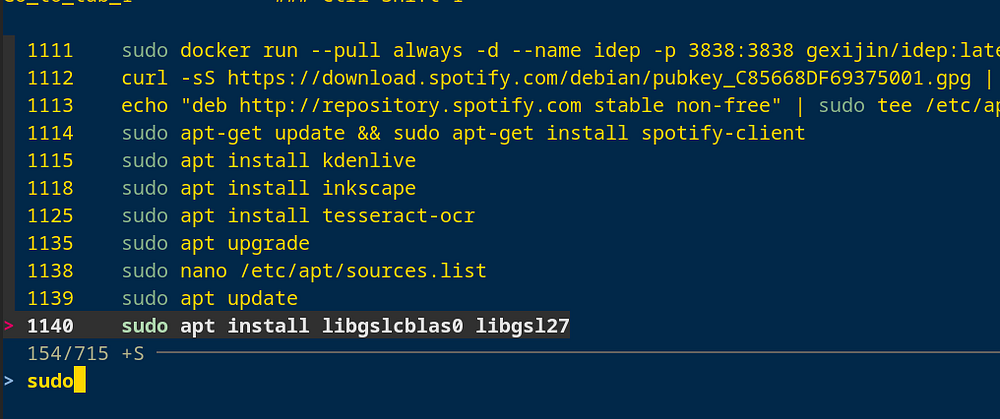
Expand your command history and add fzf fuzzy search to your terminal.
Why Improve Your Bash History
Enhancing your Bash history gives you:
- Faster command recall
- Shared history across all terminal sessions
- Useful timestamps for every command
Step 1: Enhance Your Bash History
Open your configuration file:
nano ~/.bashrc
Add the following:
# Remove duplicate history entries
export HISTCONTROL=ignoredups:erasedups

# Increase history size
export HISTSIZE=1000000
export HISTFILESIZE=1000000

# Add timestamps
export HISTTIMEFORMAT="%F %T: "

# Sync history across sessions
export PROMPT_COMMAND="history -a; history -c; history -r; $PROMPT_COMMAND"
Apply the changes:
source ~/.bashrc
Step 2: Add Fuzzy Search With fzf
fzf enables flexible and fast command searching by matching partial input.
How Fuzzy Search Helps
- Matches partial or out of order characters
- Ranks results by relevance
- Handles slight typos
- Works instantly even with large histories
2.1 Install fzf
Ubuntu or Debian:
sudo apt-get update
sudo apt-get install fzf
2.2 Enable fzf Key Bindings
Add this to your ~/.bashrc:
if [ -f /usr/share/doc/fzf/examples/key-bindings.bash ]; then
  source /usr/share/doc/fzf/examples/key-bindings.bash
fi
Reload your shell:
source ~/.bashrc
2.3 Search History With fzf
Press Ctrl + R to open an interactive fuzzy history search. Type any part of a command and fzf will find matching entries.
Resources
- Bash History Documentation
- fzf GitHub Repository